
Since version 2.6.0 you are able to add variable pricing for each season rate. This option allows
to set the price variation according to a number of guests indicated in the search availability
form. In other words, you can set different prices for the same accommodation depending on a
number of guests. Follow the steps below to learn how it works:
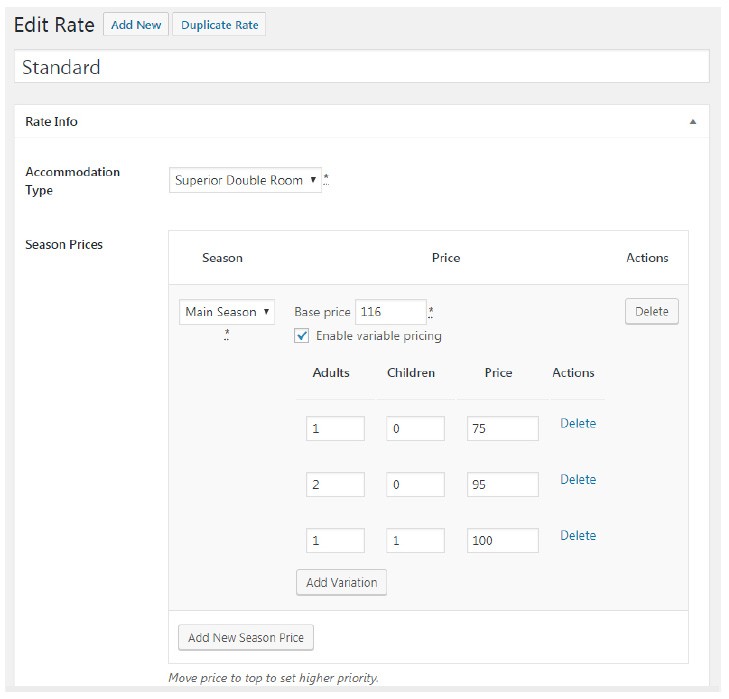
– Go to edit any rate and check Enable variable pricing option. In our case it is a
standard rate of Superior Double Room with a following capacity 2 Adults 1 Child
– Once it’s checked, you can add the first variation – a number of Adults and Children and
a price of this variation.
– Add 1 Adult and and 0 Children and set a price for this variation. Note: it can be lower or
higher price than a base rate.
– Add a new variation and type 2 Adults and 0 Children and set a price for this variation.
– Add another variation for 1 Adult and 1 Child and set the price.
– Now you can add one more Variation (2 Adults and 1 Child, i.e. max capacity for this
accommodation) or leave it as it is as a Base Rate should be applied if search parameter
is not found among price variations.
When your site visitors perform a search, they will see prices of accommodations depending on
available variations you set.